

How FAQs Improve Customer Trust and Conversions
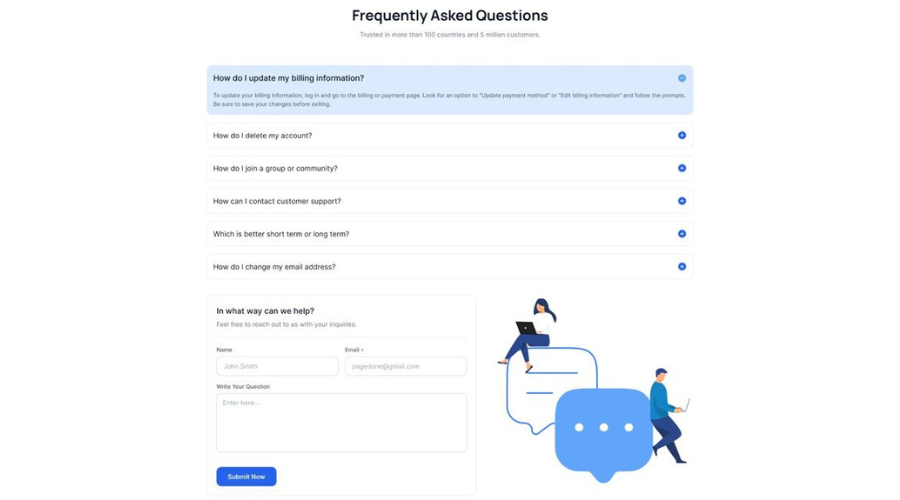
FAQs That Guide, Reassure, and Build Lasting Trust
When someone lands on your website, they usually have a few quick questions in mind. They want to know if your product fits their needs, how delivery works, what happens if something goes wrong, and whether they can rely on you. A good FAQ page meets them right there, with clear answers that feel human and honest.
FAQs are often treated like a last step, something to add once the main pages are done. In reality, they can do a lot of the heavy lifting. They can calm doubts, set the right expectations, and help people decide faster. When your answers feel helpful and real, trust grows, and conversions often follow.
Why FAQs Build Trust From the First Visit
FAQs work best when they match what customers actually want to know. They reduce mental effort by putting answers in one easy place and using simple wording. When people feel understood, they feel safer taking the next step.
Trust is not only about big promises. It is also about small moments that show you are prepared, clear, and consistent. FAQs create those moments by answering questions before customers need to ask them.
FAQs create a feeling of openness
An FAQ page can feel like a friendly conversation that starts before a customer reaches out. When your brand answers common questions without hiding anything, it signals that you have nothing to cover up. That simple feeling of openness makes people more comfortable.
Clear answers also reduce suspicion. People are used to brands that talk around the point. When your FAQ speaks directly and kindly, it feels like a real person wrote it, and that builds trust faster than fancy marketing lines.
FAQs show you understand real customer needs
When the questions sound like the customer’s own thoughts, it creates instant connection. It tells visitors that you have listened to past buyers and you know what usually matters. That sense of being understood is a strong trust signal.
Over time, your FAQ becomes a record of what customers care about most. It shows you are paying attention, and it makes your business feel more dependable and easier to work with.
FAQs reduce confusion at the right moment
Confusion is common during browsing and checkout. A visitor may like the product but still pause because one detail is unclear. FAQs help at that exact moment by giving quick clarity without pushing people to contact support.
When the path feels clear, people keep moving. A simple answer about sizing, shipping time, setup, or returns can remove the pause that often leads to leaving the page.
FAQs set expectations in a calm way
Customers trust brands that set clear expectations. Your FAQ can explain what happens after purchase, how long steps take, and what customers should prepare. This reduces surprises and makes the experience feel smoother.
Expectation setting also protects your relationship with customers. When people know what to expect, they are less likely to feel uncertain later, and more likely to feel that your brand is reliable.
FAQs signal professionalism and readiness
A well-written FAQ page feels like a sign that the business is organized. It shows that you have thought through the customer experience and prepared answers ahead of time. That kind of readiness feels professional and reassuring.
It also suggests that your support team is not the only place where help exists. Customers can help themselves, and that builds confidence that your business is built to serve them well.
How FAQs Turn Questions Into Confidence
Trust grows when customers see consistent, honest answers across your site. FAQs support that by giving direct responses that match your policies and your tone. When your FAQ and your checkout process say the same thing, people feel confident.
Confidence is often the missing piece between interest and action. The best FAQs do more than share information. They make customers feel steady, informed, and ready.
Clear language makes your answers believable
Simple wording feels honest because it leaves less room for doubt. People trust what they can understand quickly. When you explain policies in everyday language, customers feel that you are speaking with them, not at them.
Clear language also reduces the fear of hidden conditions. A clean, easy answer about pricing, timelines, or steps helps people feel that they have the full picture.
Specific details build credibility
Details make answers feel real. If you say “shipping is fast,” that feels vague. If you say “most orders arrive in three to five business days,” that feels solid. Customers trust specifics because they can picture the experience.
Being specific also shows you have real processes behind the scenes. It suggests planning, systems, and care, all of which support trust.
A consistent tone makes the brand feel human
Tone matters more than most people think. A warm, calm voice in FAQs can make a brand feel approachable. When customers feel they can ask questions without being judged, they feel closer to the business.
Consistency also helps. If your product pages are friendly but your FAQ sounds stiff, people may feel a mismatch. A steady voice across pages makes the brand feel more real and trustworthy.
Honest policy explanations reduce stress
Policy pages can feel intimidating when they are written like legal documents. Your FAQ can translate those policies into normal language. That reduces stress and makes customers feel like you are on their side.
Honesty also means explaining how you handle edge cases. When customers see that you have thought about common problems and you explain what happens, they feel safer choosing you.
Visual clarity supports trust too
Trust is not only about words. If your FAQ is easy to scan, people feel more in control. Short paragraphs, clear question wording, and clean spacing help customers find answers faster.
When answers are easy to find, customers feel respected. They feel that you value their time, and that often shapes how they judge your business.
How FAQs Improve Conversions Without Feeling Pushy
Conversions usually improve when people can move forward without friction. FAQs reduce friction by addressing doubts and guiding customers toward the right choice. This can happen quietly, without hard selling.
When FAQs are done well, they support decisions. They help customers choose the right product, understand the next steps, and feel confident enough to buy or sign up.
FAQs help customers choose the right product faster
Many customers compare options and get stuck. They might wonder which plan fits their needs or which product version is right. FAQs can answer those comparison questions in a simple, neutral way.
The result is faster decision making. When customers feel sure they are choosing correctly, they are more likely to complete the purchase and less likely to abandon the process halfway.
FAQs address price and value questions clearly
People often pause when they see a price and try to decide if it is worth it. A good FAQ can explain what is included, how billing works, and what the customer gets at each step.
This kind of clarity supports conversions because it reduces second guessing. Customers do not need to guess what they are paying for, so they feel more comfortable moving ahead.
FAQs reduce checkout hesitation
Checkout is where small doubts become big pauses. Customers may wonder about delivery time, payment methods, return rules, or warranty coverage. When these answers are easy to access, customers can keep going.
A calm answer at the right time can prevent a dropout. The smoother the checkout feels, the more likely customers are to complete it.
FAQs can guide people to the next step
FAQs can gently guide action by explaining what to do after reading the answer. For example, an answer can end by telling customers where to find sizing info, how to start a free trial, or where to track an order.
This works because it feels helpful, not salesy. People appreciate guidance when it saves time and helps them move forward with confidence.
FAQs support repeat purchases and referrals
Conversions are not only first time sales. FAQs also help existing customers get value from what they bought. When customers can solve small issues quickly, they stay happy and are more likely to buy again.
Helpful FAQs also reduce frustration that can lead to bad experiences. When customers feel supported, they are more likely to recommend you to others.
Creating FAQs That Customers Actually Use
A great FAQ page starts with real questions and strong organization. Customers rarely read every word. They scan and look for the exact phrasing that matches their concern. Your job is to make the right answer easy to spot.
You can also treat the FAQ as a living page, not a one time task. As new questions appear in support chats and emails, your FAQ can grow and stay useful.
Start from real conversations and data
Your best questions are often hiding in plain sight. Look at customer emails, chat logs, call notes, product reviews, and search terms on your site. These sources show what people actually ask, in their own words.
When you use that language, customers recognize it instantly. That recognition makes the FAQ feel made for them, and it increases both trust and usage.
Group questions in a way that matches how people think
Organization should feel natural. Customers usually think in themes like shipping, returns, pricing, setup, and account access. When your categories match those themes, people find answers faster.
A strong structure also reduces overwhelm. Instead of one long page, customers see a clear path to the section that fits their need.
Write answers like a helpful teammate
People enjoy answers that feel friendly and direct. Short sentences, simple words, and a calm tone go a long way. The goal is to help, not to impress.
It also helps to explain the reason behind certain policies when possible. A brief, human explanation can make a rule feel fair and respectful.
Use patterns to keep writing consistent
Consistency makes the page feel reliable. If some answers are long and others are one line, customers may wonder if the information is complete. A simple pattern helps you keep the same level of clarity across topics.
If your team writes FAQs together, shared formats can help a lot. A set of FAQ Templates can also make updates faster while keeping the voice consistent and aligned.
Place your FAQs where people need them
A strong FAQ page should be easy to find from the main menu or footer, but that is only the start. Customers also benefit when the most relevant questions appear near product pages, pricing pages, and checkout.
When answers show up near the decision point, conversions can improve. Customers get clarity while they are already ready to act.
Improving FAQs Over Time for Long Term Growth
The best FAQ pages keep getting better because customer needs change. New products, new policies, and new buying habits create new questions. When you update your FAQ regularly, trust stays strong and conversions stay steady.
You can also measure what is working by tracking how people use the page. Simple tracking can show you what questions matter most and which answers still feel unclear.
Use search and page data to spot gaps
If your FAQ has a search bar, the search terms can reveal what people are looking for. Even without a search bar, analytics can show which questions get clicked most and which pages people visit before they buy.
These signals help you improve the FAQ based on real behavior. When the FAQ matches customer intent, it supports both trust and conversions.
Update answers when policies or products change
Keeping answers current protects trust. When customers find an outdated shipping timeline or a policy that no longer applies, it can create doubt. Regular reviews help you avoid that.
A simple routine works well, like a monthly check for fast changing topics and a quarterly check for the whole page. This keeps the content aligned with reality.
Add examples that make answers easier to apply
Examples help people understand how something works in real life. If you explain returns, you can describe a simple situation and what happens. If you explain billing, you can describe when charges happen and what the receipt looks like.
Examples reduce effort for customers. They also reduce misunderstandings, which helps support teams and keeps customers feeling confident.
Keep the FAQ aligned with support and sales teams
Your FAQ should match what your support team says and what your sales team promises. When everyone shares the same answers, customers get a consistent experience from first click to post purchase help.
Regular sharing helps here. Support teams can flag repeated questions, and sales teams can share where leads often hesitate. The FAQ becomes stronger when it reflects both.
Treat the FAQ as part of the customer experience
An FAQ page is not just a help section. It is part of the overall journey, just like product pages and checkout. When you see it that way, you write with more care and clearer intent.
Over time, this mindset turns FAQs into a quiet advantage. Customers feel supported, and they trust your brand because it feels clear and steady.
Closing Thoughts: FAQs as a Trust and Conversion Partner
FAQs improve customer trust because they show clarity, openness, and real support. They answer questions in the customer’s language and reduce confusion when decisions matter most. That steady help makes your brand feel dependable from the first visit.
FAQs improve conversions because they remove friction and guide action without pressure. They help customers choose correctly, understand costs, and complete checkout with confidence. When the path feels clear, people are more likely to follow it.
The strongest FAQ pages stay close to real customer questions and stay updated as your business grows. When you treat FAQs as a key part of your experience, you build trust that lasts and conversions that keep improving.
FAQs
What should be included in a good FAQ page?
A good FAQ page should cover real questions customers ask before and after a purchase. This includes details about pricing, delivery, returns, account access, usage, and support. The goal is to remove confusion by providing clear, honest answers in simple language that users can understand quickly.
How do FAQs help improve conversions?
FAQs help conversions by removing hesitation at key decision points. When users find clear answers about costs, processes, or policies without searching elsewhere, they feel more confident moving forward. This clarity reduces friction and helps users complete actions like signing up or making a purchase.
Where should FAQs be placed on a website?
FAQs work best when they are easy to find and placed where questions naturally arise. Along with a dedicated FAQ page, important questions should appear near product pages, pricing sections, checkout flows, and account areas. This ensures users get answers exactly when they need them.
How often should an FAQ page be updated?
An FAQ page should be updated whenever products, policies, or customer behavior changes. A regular review schedule helps keep answers accurate and relevant. Even small updates based on new customer questions can significantly improve trust and usability over time.
How do I know which questions customers actually want answered?
The best questions come from real customer interactions. Support emails, chat conversations, sales calls, reviews, and on-site searches reveal what users truly care about. Using their exact wording makes the FAQ feel familiar and increases the chances that customers will use it.
Can FAQs reduce customer support workload?
Yes, well-written FAQs reduce repetitive support requests by helping customers solve common issues on their own. When answers are easy to find and clearly explained, users rely less on support teams, leading to faster resolutions and a better overall customer experience.
 Turkish
 English
 Arabic
 French
 Spanish
 Portuguese
 Deutsch
 Dutch
Dutch
 Italiano
 Russian
 Romaian
 Portuguese (Brazil)
 Greek
Greek